How to Choose the Right Addressable LED Strip Controller A Selection Guide

For addressable LED strip projects, choosing the right controller is just as important as choosing the strip itself. Differences in IC, communication protocol, pixel count, voltage, and control method can all affect controller compatibility and the final lighting effect. If the wrong controller is selected, even a high‑quality strip may fail to perform as it should.
The addressable LED strip market keeps expanding, ranging from SPI strips like WS2812B and SK6812 to DMX512 strips, with each type differing in how signals are transmitted and pixels are controlled. At the same time, small decorative projects, commercial spaces, and large‑scale architectural lighting projects each call for different controller requirements. 
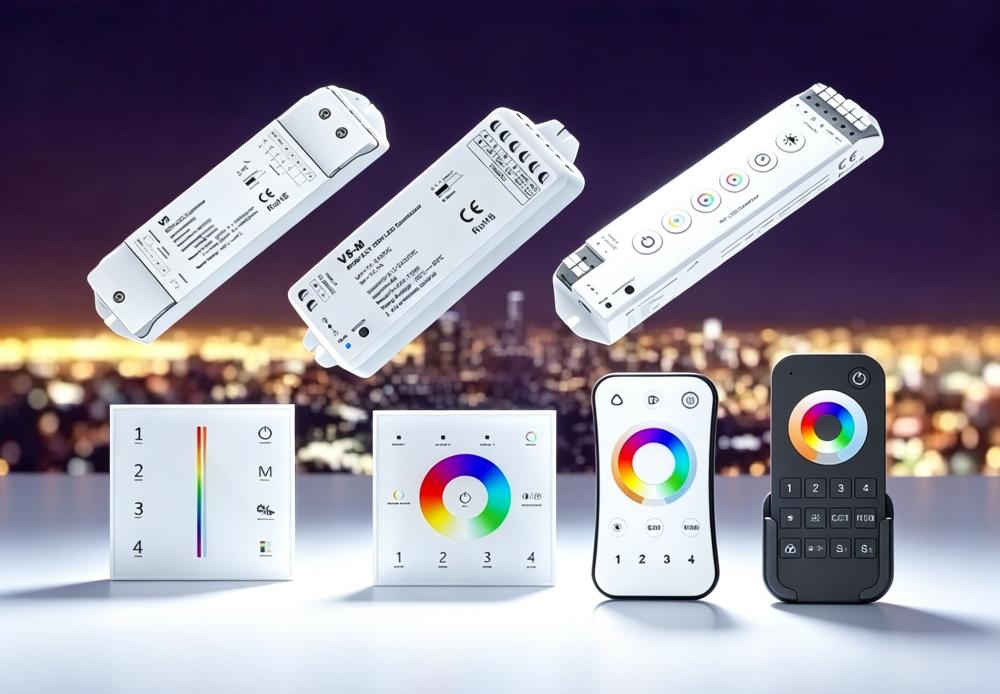
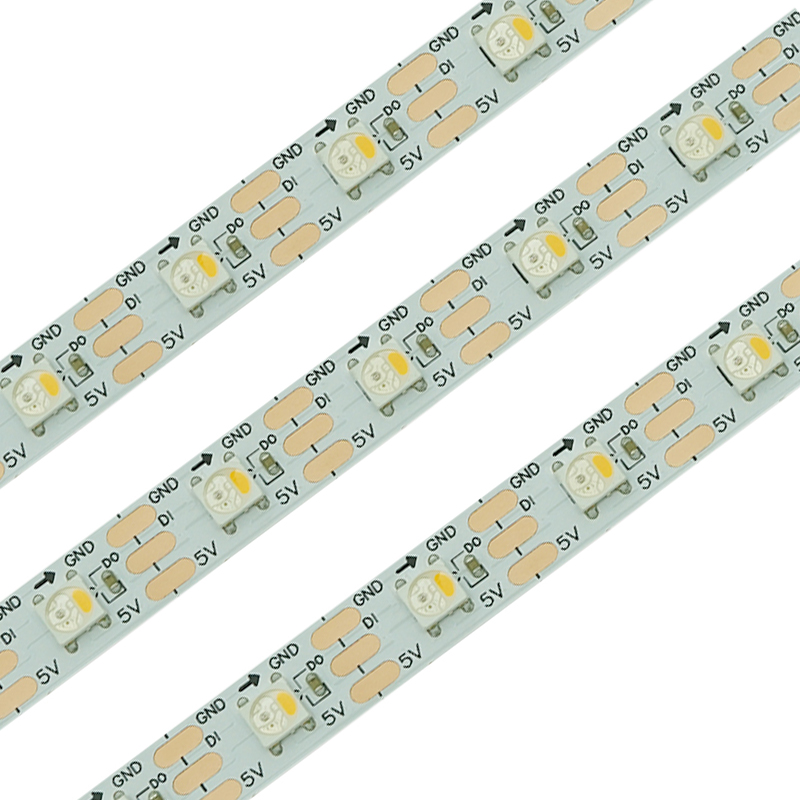
led tape controller  spi controller
With over 13 years of experience in LED strip manufacturing and project delivery, LW Lighting has worked with a wide range of addressable LED strips and control solutions, offering controller selection guidance tailored to different projects. That's why we've put together this practical guide — to help you evaluate IC type, communication protocol, pixel count, number of ports, control method, signal distance, and software compatibility, so you can more clearly determine which addressable LED tape controller best suits your needs, whether you're working with an SPI controller setup or a DMX led controller for DMX‑based installations.
Next, let's start by understanding the basic working principles of addressable LED strips.

Understanding Addressable LED Strips

Before selecting a controller for addressable LED strips, it's important to first understand how the strips themselves work. Unlike ordinary LED strips that can only be adjusted as a whole for brightness or color, addressable LED strips incorporate a control IC into the strip itself, allowing individual LEDs or pixels to be controlled separately or in groups according to a preset program.
By sending the appropriate digital signal through a controller, addressable LED strips can produce dynamic effects such as chasing, running, gradient fading, flashing, wave, and pixel animations. This makes them widely used in architectural lighting, commercial displays, entertainment venues, stage lighting, and ambient lighting projects.
(1) Common Addressable LED ICs
Addressable LED ICs generally fall into two categories: built‑in ICs and external ICs. Built‑in ICs are integrated directly inside the LED chip, while external ICs are mounted separately on the PCB. Different ICs vary in control method, voltage, pixel control method, and application scenarios.
Common Built‑in Addressable LED ICs
LED IC Control Method Common Voltage Pixel Control LED Type Key Features Typical Applications
WS2812 / WS2812B Single‑wire data 5V 1 LED = 1 Pixel RGB Built‑in IC, supports individual pixel control, widely used DIY, signage, decorative lighting
SK6812 Single‑wire data 5V 1 LED = 1 Pixel White/RGB / RGBW Supports white, RGB, and RGBW options Residential, commercial lighting, pixel lighting
APA102 Data + Clock 5V 1 LED = 1 Pixel RGB High‑speed data transmission, 20 kHz PWM Dynamic lighting, LED displays
HD107 / HD108 Data + Clock 5V 1 LED = 1 Pixel RGB HD107S: 26 kHz PWM, clock frequency up to 40 MHz; HD108: 27 kHz PWM, 16‑bit grayscale, high‑speed data transmission Stage lighting, displays, dynamic lighting
WS2813 Dual‑signal 5V 1 LED = 1 Pixel RGB Supports signal breakpoint continuation Architectural decoration, commercial lighting
WS2815 Dual‑signal 12V 1 LED = 1 Pixel RGB Supports signal breakpoint continuation Building outlines, outdoor decoration
GS8208 Dual‑signal 12V 1 LED = 1 Pixel RGB Supports signal breakpoint continuation Architectural lighting, outdoor decoration
UCS9812 Single‑wire data 24V 1 LED = 1 Pixel / 4 LED = 1 Pixel / 6 LED = 1 Pixel RGB 24V, individual pixel control, 16‑bit Ambient lighting, smart home
Common External Addressable LED ICs
LED IC Control Method Common Voltage Pixel Control LED Type Key Features Typical Applications
WS2811 Single‑wire data 12V / 24V 12V: 3 LEDs = 1 Pixel; 24V: 6 LEDs = 1 Pixel RGB External IC, supports grouped pixel control Architectural lighting, outdoor signage
SM16703 Single‑wire data 12V / 24V 12V: 3 LEDs = 1 Pixel; 24V: 6 LEDs = 1 Pixel RGB External driver IC Building outlines, landscape lighting
TM1934 Single‑wire data 12V / 24V 12V: 3 LEDs = 1 Pixel; 24V: 6 LEDs = 1 Pixel RGB / RGBW Suited for digital LED strip solutions Commercial lighting, architectural decoration
WS2818 / SM16704 Dual‑signal 12V / 24V 12V: 3 LEDs = 1 Pixel; 24V: 6 LEDs = 1 Pixel RGB Supports signal backup and breakpoint continuation Architectural, outdoor lighting
UCS1903 Single‑wire data 12V / 24V 12V: 3 LEDs = 1 Pixel; 24V: 6 LEDs = 1 Pixel RGB Suitable for longer strip runs Building outlines, landscape lighting
UCS512 / SM18512 DMX512 12V / 24V 12V: 3 LEDs = 1 Pixel; 24V: 6 LEDs = 1 Pixel White/RGB / RGBW Professional DMX led controller compatibility Stage, architecture, entertainment venues, commercial lighting
(2) 3‑Wire vs. 4‑Wire ICs
Addressable LED strips typically use one of two common wiring configurations: 3‑wire and 4‑wire. The main difference lies in how the data and clock signals are transmitted, which also affects compatibility between the controller and the LED strip.
3‑wire addressable LED strips typically use: VCC (positive) + Data + GND (negative) Data and clock signals share the same data line, commonly seen in products like WS2812B, SK6812, and WS2811.
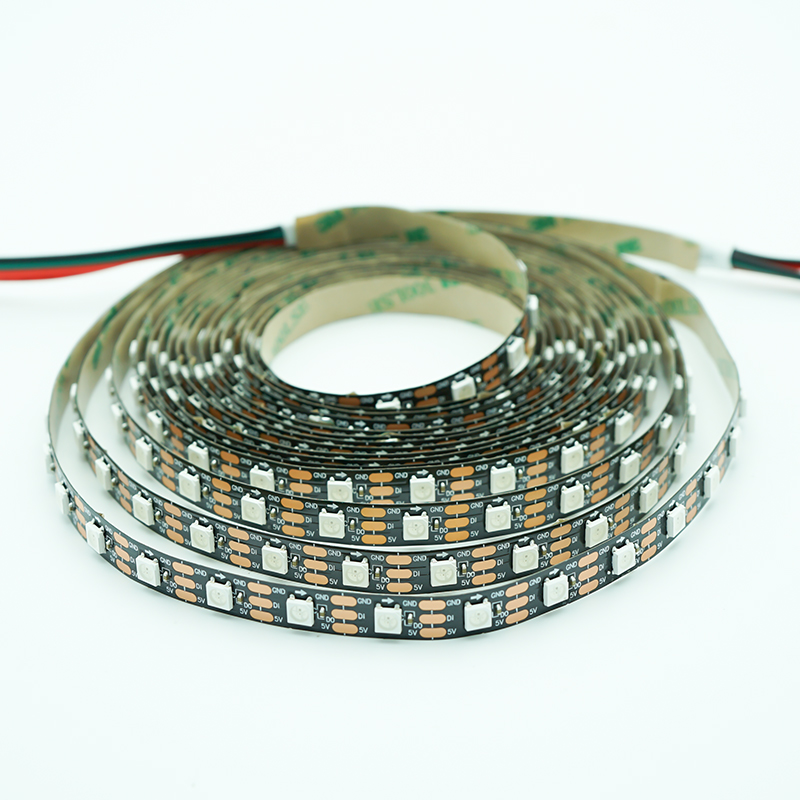
addressable LED strips sk6812 rgbw pixel led strip ws2813 programmable rgb led strip
                WS2812B 3‑wire                                         SK6812 3‑wire                                                WS2811 3‑wire
4‑wire addressable LED strips typically use: VCC (positive) + Data + Clock + GND (negative) Data and clock signals are transmitted through two separate lines, commonly found in ICs such as APA102, HD107, HD108, and SK9822. This approach enables higher data transmission speeds and refresh rates, making it better suited for projects with more demanding dynamic lighting effects.
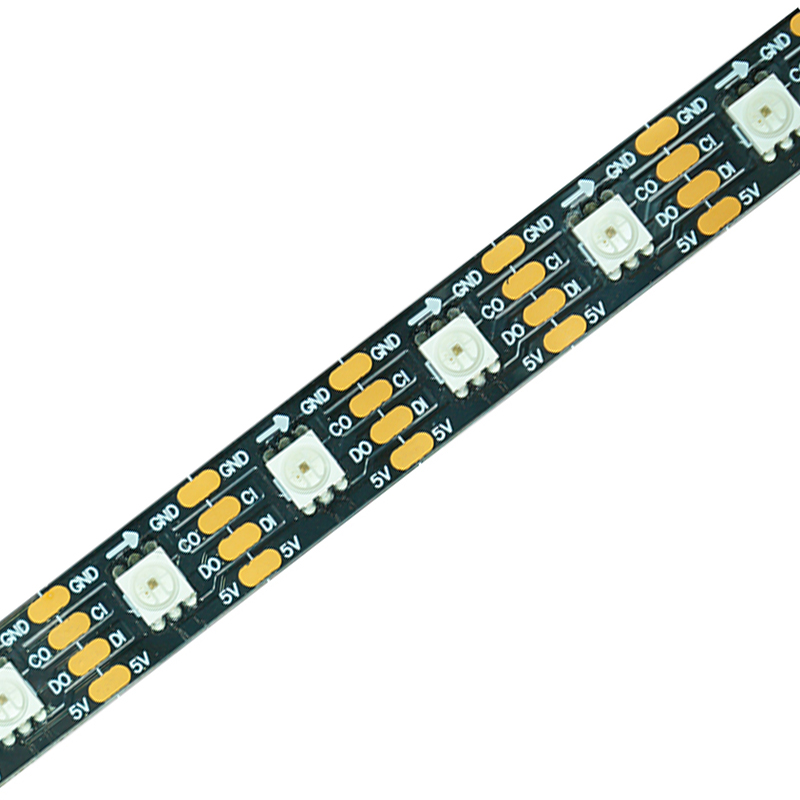
hd107s high speed digital led strip   hd108 addressable led strip
                                         HD107 4‑wire                                                                        HD108 4‑wire
(3) Breakpoint‑Resume ICs
Some addressable LED strips use a breakpoint‑resume design, which adds a backup signal channel on top of standard data transmission.
These strips typically include:
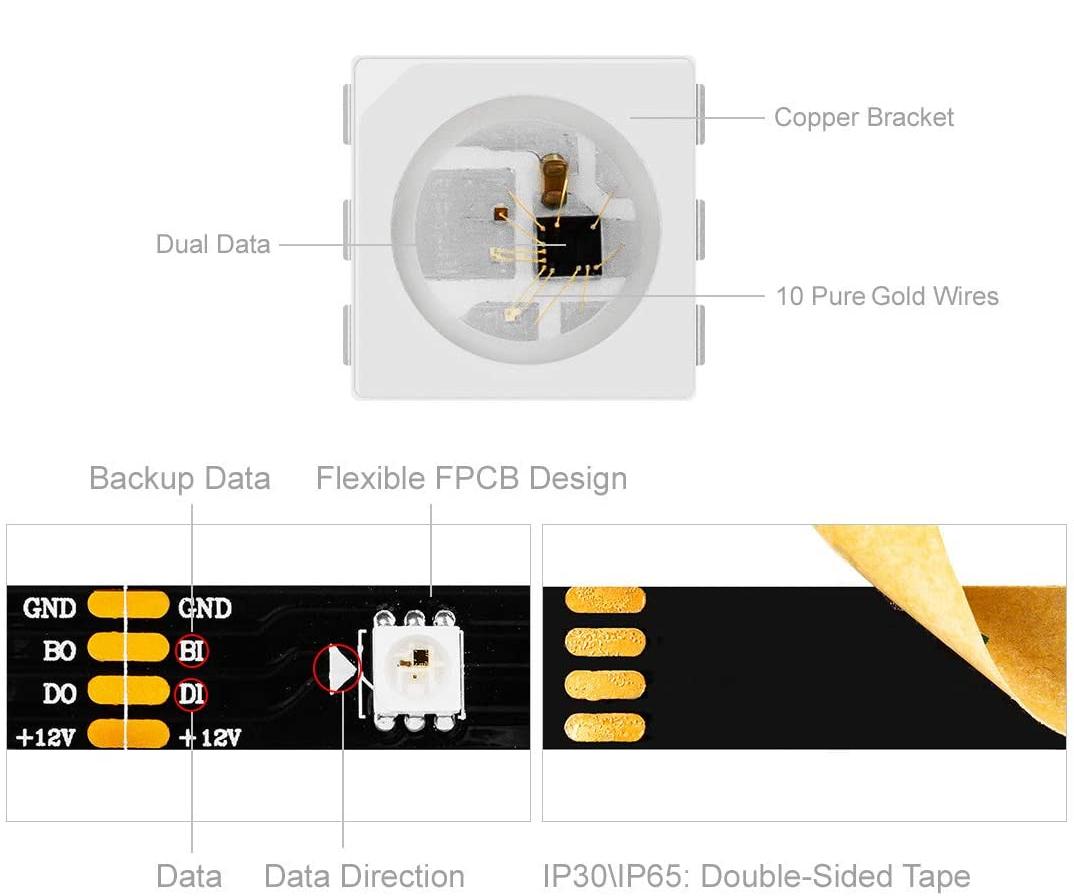
ws2815 programmable led strip ws2815 Breakpoint‑Resume ICs LED Strip
Under normal operation, the control signal travels through the main data line. If a fault occurs at a particular LED or IC and interrupts the main signal, the backup signal line can continue transmitting data downstream, reducing the impact of a single point of failure on the following LED pixels.
Common breakpoint‑resume ICs include WS2813, SK6813, LB1934A, WS2818B, and WS2814. WS2815, CS8812, and RT1809 are generally interchangeable and compatible with one another, though CS8812 includes gamma correction, which makes it somewhat more expensive — its original IC designation is GS8208. Since different IC manufacturers may use different model numbers and naming conventions, when actually selecting a controller, it's best not to rely on the IC model alone, but to further confirm the signal protocol, data format, and controller compatibility.

How Does an Addressable LED Strip Work?

A complete addressable LED lighting system can be understood as follows:
The controller sends control instructions to the addressable LED strip via a communication protocol.
Once the IC on the strip receives the data, it controls the LED pixels according to the corresponding address information. Different control instructions can be sent to each IC, allowing LEDs within different IC‑controlled zones to display different patterns, creating complex dynamic effects.
It's worth noting that one LED does not necessarily equal one pixel. For example, many 5V addressable strips control one LED per pixel, while some 12V addressable strips may have 3 LEDs sharing a single IC.
This distinction matters because controller capacity is typically calculated based on pixel count, not simply the number of LEDs.

Types of Addressable LED Strips

Addressable LED strips can be classified by IC type, voltage, color configuration, and communication protocol. Understanding these differences is essential when choosing a compatible LED strip controller.

By IC Type:

(1) 5V RGB Addressable LED Strips
(2) 12V/24V RGB Addressable LED Strips
WS2815 CS8812 RT1809 LED Pixel Strip    TM1934 LED Strips
WS2815 / CS8812 / RT1809 LED Pixel Strip                                                              TM1934 LED Strips
dmx controlled led strip lights
(3) RGBW Addressable LED Strips
(4) White Addressable LED Strips
  5V SK6812 white led strips    12V WS2818B white led strips   24V DMX512 White led strips
        5V SK6812 white strips                      12V WS2818B white strips                           24V DMX512 White strips

By Communication Protocol: SPI and DMX

In terms of communication protocol, addressable LED strips fall mainly into two categories: SPI addressable LED strips and DMX512 addressable LED strips. 
For more information, please consult:DMX vs SPI: Which Addressable LED Strip Protocol Is Right for Your Project?

Key Principles for Controller Selection

1.Match the Controller to the Strip's Protocol
The most common control protocols for addressable LED strips are:
SPI: WS2812B, WS2815B, WS2813B, SK6812, SK6813, WS2811, WS2818B, UCS1903, etc.
DMX512: primarily used for engineering lighting, stage, architectural, and commercial projects that require professional‑grade lighting control
Before selecting a controller, you first need to confirm the IC and communication protocol used by the LED strip. SPI strips need to be paired with an SPI controller, while DMX512 strips need to be paired with a DMX512 controller.
2.Match the Controller to the Pixel Count
When selecting a controller, the number of ports and control capacity should be determined based on the project's pixel count.
For a dmx controller rgb led strip setup — whether single‑port, 4‑port, or 8‑port — it's recommended to keep the pixel count within 300 per controller.
For SPI‑based addressable LED strip controllers, a single‑port controller is generally recommended to handle up to 1,500 pixels, while for 4‑port or 8‑port controllers, each port typically handles around 600 pixels.
For projects requiring 8‑port controllers, if the total number of controllers needed is 3 or fewer, a standard standalone controller is generally sufficient. If more than 3 controllers are needed, a master‑slave control setup is recommended, using single‑port standalone controllers with a capacity of up to 2,048 pixels each.
Note: pixel count refers to the number of pixels, not the number of individual LEDs. 5V addressable LED strips are typically controlled on a one‑LED‑per‑pixel basis — so 60 LEDs equal 60 pixels. 12V addressable LED strips may be controlled on a one‑LED‑per‑pixel or three‑LEDs‑per‑pixel basis, among other configurations.
Taking a strip with 60 LEDs per meter as an example, this could mean either 60 pixels or 20 pixels, depending on the configuration. Understanding the pixel count before choosing a controller is essential for calculating the right multi‑port controller for the project.
3.Consider Signal Transmission Distance
Depending on the project, the number of LED strips in the smallest control unit can vary — some projects use relatively few LED strips, but with a very scattered layout. To avoid signal loss caused by distance, it may be necessary to add extra controllers beyond the basic count, based on how spread out the installation points are.
So beyond LED strip quantity and pixel count, controller selection should also take into account:
  • The actual physical distribution of the LED strips
  • The distance between strip sections
  • The signal transmission distance between the controller and the LED strips
  • Whether additional controllers or sub‑controllers are needed
4.Consider the Control Method, as Programming Effects Vary with Update Frequency
When selecting a controller, consider whether it needs to connect to a computer, and whether an online or offline controller better suits the project. If lighting effects need to be changed frequently and the project involves a larger number of controllers, a card‑based controller or an online controller with a master/sub‑control setup is recommended. If only simple control over fixed programs is needed, a card‑based controller or a basic standalone controller will usually suffice.
5.Consider Whether the Client Needs to Integrate with Other Control Systems
If the client needs to connect the LED strips to another lighting control system — such as Madrix or a professional DMX console — it's important to confirm in advance the controller's input protocol, software compatibility, and pixel capacity.
6.Controller Models for Different Functional Requirements
1.Console Control Mode (No Master Controller Required)
S‑8000L — syncs with multiple controllers, each loaded with its own program card, without requiring a separate master controller.
 
S‑8000L LED Controller
                                                                                     S‑8000L
S‑8000L controller Connection diagram
2.Console Master Controller + Sub‑Controller
XB‑Z2‑L master controller + T‑790K sub‑controller — the master controller comes pre‑loaded with a program card, while the sub‑controller does not.
  XB‑Z2‑L controller
                                                                                               XB‑Z2‑L
  T‑790K controller
                                                                                                T‑790K
XB-Z2-L Connection diagram
3.Controllers Compatible with Madrix Online Software
T‑790K (Madrix Edition) — 8‑port, single port supports up to 510 SPI pixels. Using Madrix to control DMX512 strips is generally not recommended, as the pixel capacity is limited — only 170 pixels per port.
4.General‑Purpose Online Controllers
General‑purpose online sub‑controller: T‑790K sub‑controller
5.General‑Purpose Offline Controllers
K1000C (with programming/coding function) — single port supports up to 1,536 pixels for SPI signal ICs, or 300 pixels for DMX512 ICs; can sync with multiple units.
K‑8000C (with programming/coding function) — 8‑port, single port supports up to 800 pixels for SPI signal ICs, or 300 pixels for DMX512 ICs; can sync across multiple channels.
K-1000C controller    K-8000C LED Controller
6.Offline Master/Sub‑Controllers
XB‑809‑A touchscreen master controller                             
XB‑809‑A touchscreen master controller     
 XB‑Z2‑L console master controller      
 XB‑Z2‑L console master controller      
Sub controller T‑790K
Sub‑controller: T‑790K
For more information, please consult our:led controller system.

Controller Selection for Different Project Types

1.Small Addressable LED Projects
For addressable LED projects with a smaller number of strips, lower pixel counts, and mainly fixed lighting effects, an SPI controller is generally the preferred choice. SPI control is well suited to smaller projects with relatively simple structures that don't require complex real‑time control.
Typical applications:
  • Display cabinet and shelf lighting
  • Small commercial spaces
  • Residential decorative lighting
  • Small signage and decorative projects
  • Decorative projects with fixed lighting effects
2.Large‑Scale LED Projects
For large architectural, commercial, stage, and other professional lighting projects that require controlling a large number of DMX512 addressable LED strips with unified management of lighting effects, a DMX512 control system is the better fit.
DMX512 is a communication protocol widely used in professional lighting control, well suited to projects that need multiple fixtures or multiple LED strip zones to run in unified, synchronized control.
3.Real‑Time Lighting Control Projects
If a project requires real‑time adjustment of lighting effects via a computer or professional lighting software, an online controller should be the priority choice.
These projects typically call for real‑time adjustments to color, brightness, dynamic effects, or playback content, so the controller needs to be compatible with a computer, Madrix, or other professional lighting control software.
Typical applications:
· Stage lighting
· Entertainment venues
· Large architectural media facades
· Commercial interactive lighting
· LED pixel art installations
· Lighting projects requiring real‑time programming
For example, a project requiring real‑time control via Madrix could use a compatible controller such as the T‑790K Madrix Version.
For real‑time control projects involving a larger number of controllers, further considerations include multi‑controller synchronization, pixel capacity, and signal transmission distance, to ensure consistent lighting effects across different zones.

Controller Selection for Different Client Types

Different clients have different needs when it comes to addressable LED strips. Designers tend to focus more on lighting effects and installation flexibility, OEM/ODM clients focus more on product compatibility and customization capability, while commercial project clients place greater emphasis on system control, synchronization, and project stability.
1.Architects and Interior Designers
Architects and interior designers typically select LED strips based on the specific space and design plan, so their main concerns are strip dimensions, pixel effects, color performance, and installation flexibility.
For small‑scale decorative lighting and design projects, SPI addressable LED strips paired with an SPI controller are usually the preferred choice, particularly for applications that call for dynamic lighting effects, pixel‑level control, and flexible programming.
We offer designers flexible LED strip customization and technical support, including small‑batch customization, sample production, precise color matching, ultra‑narrow strips, cuttable strips, outdoor waterproofing, and custom shapes, along with product selection guidance, technical consultation, and project planning support.
2.Manufacturers and OEM/ODM Partners
Manufacturers and OEM/ODM clients typically need to integrate addressable LED strips into their own products or lighting systems, so the controller needs to match the product structure, strip IC, control system, and final application.
We support OEM/ODM custom production with NDAs and long‑term supply assurance. Products can be tailored to customer specifications — covering design, dimensions, and packaging — while we help optimize costs and production processes to ensure fast mass production and strong market competitiveness.
3.Retailers and Distributors
Retailers and distributors generally need standardized products with clear specifications, broad application range, and ease of sale and installation.
For commonly used addressable LED strip products, giving priority to SPI‑based options is generally advisable, as SPI products come in a wide variety and suit applications ranging from display and decorative lighting to residential and small commercial lighting.
We offer standardized products with stable inventory and flexible ordering, along with support for small‑batch trial sales, product bundling suggestions, and marketing materials. Packaging and labeling are flexible, and we provide sales training, technical documentation, and product support to help channel partners bring products to market quickly.
4.Commercial and High‑End Project Clients
Commercial and high‑end projects typically involve multiple zones, large numbers of LED strips, and complex lighting effects, so beyond pixel count and port count, factors like controller synchronization, signal transmission distance, and compatibility with professional lighting control systems also need to be considered.
For architectural lighting, stage, hospitality, commercial spaces, and large‑scale landscape lighting projects, a DMX512 control system is generally the preferred choice. If the project needs to connect to a professional lighting console or other lighting software, controller compatibility with the overall control system should also be confirmed.
For projects with a larger number of controllers or a more scattered strip layout, a master‑slave control setup can be used, allowing a master controller to manage multiple sub‑controllers and achieve synchronized lighting effects across different zones.
We provide full‑process support — from product selection, solution design, and effect simulation to technical support and project delivery — with dedicated project support staff to help resolve product selection, control system matching, and on‑site application issues.

How to Match a Controller to Your LED Strip

  • Step 1: Identify the LED Driver Chip (IC) For example, WS2812B, WS2815B, SK6812, WS2811, WS2818B, etc.
  • Step 2: Confirm the Communication Protocol Determine whether the strip uses SPI or DMX512 — the controller must match the strip's protocol.
  • Step 3: Check the LED Strip Voltage Confirm whether the strip is 5V, 12V, 24V, etc., and make sure the controller and power supply system match accordingly.
  • Step 4: Calculate the Pixel Count Determine whether it's 1 LED = 1 pixel or 3 LEDs = 1 pixel, then calculate the total pixel count.
  • Step 5: Determine the Number of Ports Needed Based on the number of strips, pixel count, and installation zones, decide between a single‑port, 4‑port, or 8‑port controller.
  • Step 6: Check the Signal Transmission Distance Based on the actual layout of the strips and the distance from the controller to the strips, determine whether additional controllers or sub‑controllers are needed.
  • Step 7: Choose Online or Offline Control Mode Fixed programs → Offline Controller Real‑time computer control → Online Controller
  • Step 8: Check Software Compatibility If using Madrix or another professional lighting control system, confirm that the controller is compatible.
  • Step 9: Determine Whether Master‑Slave Control Is Needed If the project requires multiple controllers to run in sync, consider a Master‑Slave Control setup.

Addressable LED Strip Controller Project Case Studies

With over 13 years of sales experience, we have helped clients around the world select the right controllers to complete their lighting projects. Below are a few real project examples:
Digital Led Strip Color Changing Lights
Customer Case Addressable RGB COB LED Strip Lightig Effects, Spotless & Continuous Light
Outdoor neon light belt installation effect display

Flexible Neon Tube Installation ‑ LED Neon Strips

Frequently Asked Questions(FAQ)

1. Can any controller be used with addressable LED strips?
No. Addressable LED strips require a controller that matches their LED IC and communication protocol. For example, SPI strips such as WS2812B, WS2815B, and SK6812 need to be paired with an SPI controller, while DMX512 LED strips require a controller compatible with the DMX512 protocol.
2. How do I determine which controller is compatible with my LED strip?
Start by confirming the IC model and communication protocol used by the strip — whether it's SPI or DMX512. Then check the strip's operating voltage, pixel count, control method, and the required signal transmission distance. Finally, confirm that the controller supports the corresponding IC, pixel capacity, and any required software or control system.
3. What's the difference between SPI and DMX512?
Both SPI and DMX512 can be used to control addressable LED strips, but they differ in communication protocol, control method, and application scenarios. SPI is a serial communication protocol that typically communicates directly with the LED IC to achieve pixel‑level lighting control, and is commonly used in residential decor, display lighting, and small‑to‑medium pixel lighting projects. DMX512, on the other hand, is a professional lighting control protocol that transmits control data over DMX channels, and is more commonly used for stage, architectural, commercial, and large‑scale lighting projects. Controller selection should be based on matching the LED strip's communication protocol with the project's control requirements.
4. What's the difference between LED count and pixel count?
A pixel is the smallest unit that can be independently controlled by the controller. For example, a 5V addressable LED strip may be controlled on a one‑LED‑per‑pixel basis, so 60 LEDs equal 60 pixels. Some 12V addressable LED strips, however, use a three‑LEDs‑per‑pixel setup, so 60 LEDs may only equal 20 pixels. For this reason, controller capacity should be calculated based on pixel count, not simply the number of LEDs.
5. How many pixels can one controller handle?
This depends on the controller model, communication protocol, number of ports, and the specific project requirements. Generally speaking, a DMX512 controller is recommended to handle no more than around 300 pixels per port, while SPI controllers typically offer higher capacity, with some single‑port controllers supporting over 1,000 pixels. For example, among the controllers LW Lighting uses, the K‑1000C supports up to 1,536 SPI pixels per port, while the K‑8000C supports up to 800 SPI pixels per port. Actual project requirements should also take refresh rate, strip type, and signal transmission distance into account.
6. Should I choose an online or offline controller?
This mainly depends on whether the project requires real‑time computer control. If the project needs to connect to a computer or software such as Madrix for real‑time lighting adjustments, an Online Controller is recommended. If the project only needs to play preset, fixed lighting programs without a continuous computer connection, an Offline Controller is a suitable choice. For projects involving multiple controllers that need synchronized operation across different zones, a Master‑Slave control setup can also be used.

Get a Quote

If you're still not sure which controller is right for your addressable LED strip project, feel free to contact us. Just let us know the strip's IC, communication protocol, pixel count, and project requirements, and we'll provide professional controller selection guidance, technical support, and project planning — along with a quote tailored to your needs.
DMX vs SPI: Which Addressable LED Strip Protocol Is Right for Your Project?
DMX vs SPI by LW Lighting: Compare addressable LED strip protocols, pixel control, signal distance and applications to find the right solution.
LED Strips for Cars: A Guide to Automotive Ambient Lighting and Installation
A modern car interior illuminated with flexible LED strips along the dashboard, door panels, and footwells, showcasing automotive ambient lighting and a clean professional installation.
LED Strips for Under Kitchen Cabinets: Ideas, Tips and How to Choose
Discover practical LED strip lighting ideas for kitchen cabinets and learn how to choose the right brightness, color temperature, and installation method.

Recommended News